How to Book the Moraine Lake Shuttle Last-Minute
Andrew Leader
—Sep 29, 2026
When Last-Minute Seats Are Released
Last-minute bookings open 2 days before the shuttle date, at 8:00 AM MDT. All time slots for that day are released at once, at the same moment.
For example, if you want to ride the shuttle on Saturday (any time slot — 7am, 9am, whatever), the entire day's inventory drops at 8:00 AM MDT on Thursday. It doesn't trickle out slot by slot — it's a single, simultaneous release, which is why the first few minutes are so competitive.
How to Get Your Booking
Here's the play-by-play for release morning:
- At 7:50am, sign in to the booking site. Being logged in before the rush avoids any last-second login friction. Create an account before this if you don't have one yet.
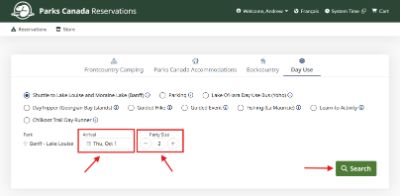
- Set up your search for your desired Arrival Date and Party Size, and click Search.
- Click into the time slot you want, and then select the Moraine Lake (Last Minute) option so you're already on the reserve page. You want to be one click away from booking, not still browsing a list.
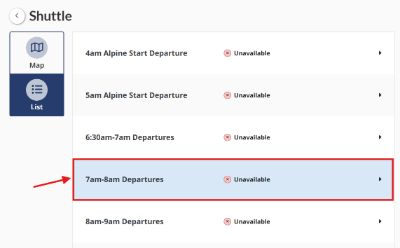
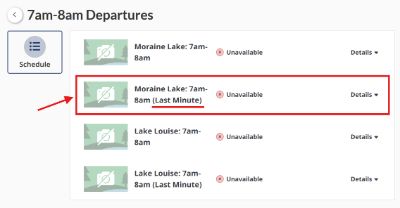
- You should see a Reserve button. Feel free to click it early to test — it'll say the slot hasn't been released yet. Just click OK and wait; this doesn't cost you anything.
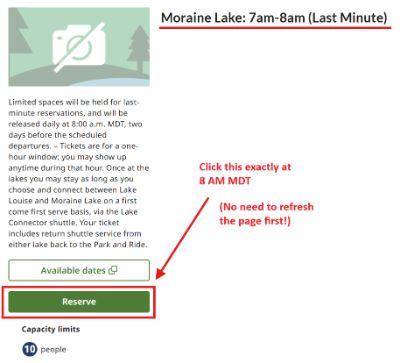
- When your clock strikes 8:00 AM MDT, click Reserve. No need to refresh the page or re-run your search — just click Reserve on the page you already had open.
- If you clicked too early, close the popup/error and click Reserve again.
- If it says all spots are taken, you were too slow this round — see the tips below for other options.
- Otherwise, move fast through the checkboxes (terms, waivers, etc.) — the slot is not held until those are checked. The payment step itself is more forgiving, since your cart is typically held for about 15 minutes once you're through the checkboxes.
If You Don't Get Your Ideal Time Slot
A few strategies can meaningfully improve your odds:
- Have backup times ready. Open multiple tabs to later time slots. For example, if you want 7 - 8 AM, have another tab open with 8 - 9 AM selected as a second choice. When you don't get the 7 AM slot, switch to your other tab and click Reserve.
- Keep clicking search if everything looks taken. Spots often reappear at random intervals — commonly 5–15 minutes after 8:00 AM — as other users' holds expire or people back out of checkout.
- Know the cutoff. By around 8:30 AM, released seats have mostly been claimed and hold-expiry reappearances slow way down. If you haven't secured a seat by then, it's usually time to try again on a different day.
Well Before Release Day
A little prep goes a long way:
- Create an account on the booking site ahead of time. Don't leave account creation for the morning of — you don't want to be filling out forms while seats are disappearing.
- Familiarize yourself with the site. Know where the date picker, party size selector, and time slot list are.
- Do a practice run. Try booking at 8:00 AM PDT a day earlier than what you need and walk through adding a slot to your cart. You don't need to pay — just get comfortable with the flow so there are no surprises on release day.
Quick Reference
| Step | Time |
| Account creation & practice booking | Any time before release day |
| Sign in | 7:50 AM MDT |
| Slot search + reserve page loaded | Before 8:00 AM MDT |
| Click Reserve | Exactly 8:00 AM MDT |
| Recheck for reappeared spots | 8:05–8:30 AM MDT |
| Odds drop significantly | After 8:30 AM MDT |
Also chasing a Lake Louise seat on the same trip? The exact same release mechanics apply there too — see our companion guide on booking the Lake Louise shuttle last-minute.